Introduction
A corporate event should not disappear after the final session ends. In Singapore and across APAC, conferences, product launches, town halls, seminars and gala dinners can all become long-term content engines when they are planned properly. By capturing the right video, photography, audio, speaker insights, audience reactions and behind-the-scenes moments, one event can support marketing campaigns, sales follow-up, internal communications, employer branding and regional engagement for weeks or even months after event day.
Why One Event Should Create More Than One Output
Corporate events require serious investment in venue, speakers, production, technology and team time. Repurposing event content helps that investment work harder. Instead of producing one event recap and moving on, your team can turn the event into a practical library of reusable assets.
This is not just a content trend. SpotMe’s content marketing for events guidance stresses that strong event marketers combine content and event strategy instead of treating them as separate activities, while Livestorm’s repurposing guide recommends adapting existing content into new formats so it can reach more audiences across more channels.
The practical benefits
- Maximise ROI: Stretch one event budget across multiple campaigns, channels and business functions.
- Reach non-attendees: Give prospects, employees, regional offices and partners access to key moments even if they could not attend live.
- Improve follow-up: Equip sales and marketing teams with relevant content for post-event emails, proposals and lead nurturing.
- Support internal alignment: Reuse leadership messages, training sessions and recognition moments across distributed teams.
- Build a stronger content pipeline: Reduce the pressure to create every blog post, video or social asset from scratch.
Start with a Content Plan Before the Event
The easiest way to waste event content is to think about it only after the event. Treat repurposing as a planning problem first. Before the agenda is finalised, decide what content the business needs, who will use it and where it will be published.
Use a simple PADR framework
A useful operating model is PADR: Pillar, Atomise, Distribute and Refresh.
- Pillar: Choose the source material with the most value, such as a keynote, panel, product demo, customer story or leadership session.
- Atomise: Break that pillar into smaller pieces, such as quotes, short clips, statistics, FAQs, explainers, carousels, sales snippets and internal updates.
- Distribute: Release the assets over several weeks across the channels your audience actually uses.
- Refresh: Update the best-performing assets later with new data, captions, regional examples or follow-up commentary.
Build a capture brief
A capture brief gives the production team and internal stakeholders a shared plan. It should include:
- Main business objectives: brand awareness, lead generation, sales enablement, employee engagement, recruitment or partner relations.
- Priority audiences: prospects, customers, employees, leadership, sponsors, media, partners or candidates.
- Must-capture moments: keynotes, launches, announcements, panel insights, VIP interviews, networking, team moments and sponsor activations.
- Required asset formats: full-session recordings, short videos, photo galleries, speaker quotes, blog outlines, internal newsletters and sales materials.
- Approval requirements: speaker permissions, attendee consent, brand review, legal review and localisation review for APAC markets.
Plan around the content calendar
Livestorm notes that repurposing is more than reposting the same thing on different channels; it means adapting material into new formats. Use that principle to build a realistic post-event calendar. For example, release an event highlight video in the first 48 hours, publish a key takeaways article in week one, share short clips over the next four weeks, and package the strongest insights into a sales deck or downloadable guide later.
Content Assets You Can Create from a Corporate Event
A single event can produce a wide mix of useful content. The goal is not to create everything possible. The goal is to choose the formats that support your business objectives.
- Highlight video: A 60- to 120-second edit that shows the atmosphere, key messages, audience energy and brand presence. Use it for LinkedIn, email follow-up, the website and future event promotion.
- Short speaker clips: 15- to 90-second clips featuring strong quotes, insights, challenges or takeaways from keynotes and panels. Use them for LinkedIn, Instagram Reels, YouTube Shorts, sales follow-up and internal learning.
- Full session recordings: On-demand access for people who missed the event. Use recordings for training, gated content, member portals or customer education.
- Blog posts and thought leadership articles: Turn panel discussions, keynote ideas and Q&A themes into readable articles. Focus on practical takeaways rather than simply transcribing the session.
- Quote cards and carousels: Pull out strong statements, stats and frameworks. Turn them into visual assets for LinkedIn, newsletters and internal channels.
- Photo galleries: Use professional images for event recaps, PR, sponsor updates, recruitment content, internal newsletters and future invitations.
- Case studies and testimonials: Capture customer stories, attendee reactions, sponsor comments and stakeholder interviews. These are useful for sales presentations and lead nurturing.
- Sales enablement packs: Package key clips, customer quotes, product demo moments and event statistics into short decks or email templates for sales teams.
- Internal communications content: Reuse leadership messages, awards, team moments and learning sessions for intranet updates, all-hands recaps and onboarding.
- Employer branding content: Show culture, collaboration, leadership visibility and employee participation. Use this for careers pages, LinkedIn hiring posts and recruitment campaigns.
- Long-form assets: Combine related sessions into an e-book, whitepaper, online course or resource hub. This works well when the event has a clear theme and strong expert content.
What to Capture During the Event
Content quality depends on what you capture on the day. A good shot list should cover more than the main stage.
- Speaker sessions and panels: Record keynotes, fireside chats, panel discussions and workshops with clear audio, stage branding and multiple camera angles where possible.
- Audience engagement: Capture applause, Q&A, live polls, attentive listening, note-taking and audience reactions. These moments make recap videos feel credible and human.
- Networking and informal interactions: Record coffee breaks, sponsor booths, exhibition areas and conversations. These visuals help show the relationship-building value of the event.
- Product demonstrations and launches: Film close-ups, presenter explanations, screen demonstrations and audience reactions. These can become sales and onboarding assets.
- Interviews and testimonials: Schedule short interviews with speakers, customers, sponsors, employees and attendees. Ask specific questions so the answers are easier to reuse.
- Behind-the-scenes moments: Capture setup, rehearsals, production coordination and team preparation. These assets are useful for employer branding and internal recognition.
- Sponsor and partner visibility: Document branded booths, stage mentions, partner interviews and sponsor activations. These assets support post-event reports and future sponsorship proposals.
- Venue, branding and atmosphere: Capture signage, registration, stage design, screens, delegate badges and branded details. These images help promote future editions.
- B-roll and location context: Film arrivals, wide shots, city context, crowd movement and transitions. B-roll gives editors flexibility when creating polished videos.
Plan Video, Photography and Livestream Production Properly
Repurposing works only when the raw material is strong enough to reuse. That means production planning must be part of the content strategy, not an afterthought.
Get the technical basics right
- Audio: Use lapel or headset microphones for speakers and dedicated microphones for panels. Always run sound checks and record backup audio.
- Lighting: Check whether the venue lighting is suitable for video and photography. Add lighting where necessary so faces, stage design and branding are clear.
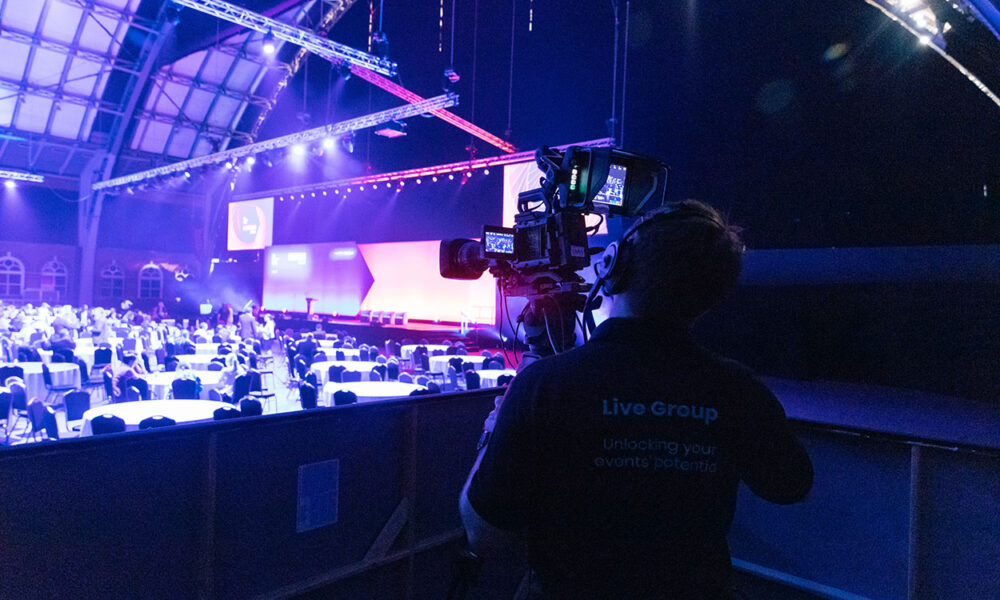
- Camera coverage: Use a mix of wide shots, speaker close-ups, audience shots and roaming camera footage. For large events, use multiple operators.
- Livestream recording: Record clean programme feeds and, where possible, isolated camera feeds. This gives editors more flexibility after the event.
- File management: Store footage, photos, audio, transcripts and graphics in a structured folder system immediately after capture.
Consider live clipping for fast-moving events
For major launches, conferences or high-profile leadership events, consider a live-to-archive workflow. Iconik’s article on live-to-archive video workflows explains how a media asset management approach can turn a media archive into a live engine for growth rather than a static storage cost. In practical terms, this means your team can identify, edit and publish key clips while the event is still happening or shortly after it ends.
Prepare for AI-assisted repurposing
AI tools can help teams move faster by generating transcripts, summaries, short-form captions, blog outlines, social posts and email drafts. HubSpot’s Content Remix page describes using AI-powered repurposing software to adjust content for different channels, while Castmagic discusses using AI to repurpose blogs, podcasts, videos and other materials. These tools are useful, but they should not replace human review, brand judgement, factual checking, localisation and compliance approval.
Repurposing Event Content for Different Channels
Each channel needs a different treatment. Avoid posting the same recap everywhere. Adapt the length, format, tone and call to action to fit the audience.
Channel-by-channel ideas
| Channel | Best assets | How to use them |
| Short clips, quote cards, carousels, photos | Share speaker insights, event takeaways, leadership views and sponsor highlights. Tag relevant people only with permission. | |
| Website / blog | Recap article, thought leadership, case study, resource hub | Turn event themes into evergreen content. Add videos and photos to make the article more useful. |
| Email marketing | Key takeaways, video links, downloadable assets | Send segmented follow-ups to attendees, no-shows, leads, partners and internal stakeholders. |
| Sales enablement | Testimonials, demo clips, slides, proof points | Give sales teams assets they can use in proposals, follow-up emails and account-based marketing. |
| Internal comms | Leadership videos, team photos, training clips | Reinforce business updates, celebrate teams and make important messages available to regional offices. |
| Recruitment / employer brand | Culture photos, team interviews, event highlights | Show what it feels like to work with the organisation and participate in meaningful company moments. |
| YouTube / video hub | Full sessions, playlists, interviews | Host longer-form content for search, on-demand viewing and future campaigns. |
| Paid campaigns | Short videos, testimonials, event visuals | Use the strongest assets in retargeting, lead generation and event promotion campaigns. |
RingCentral’s guide to repurposing event content summarises the core logic well: repurposing extends lifespan, increases reach and creates content variety. Use those three goals as a quick filter when deciding which assets to prioritise.
How Event Content Supports Sales, Marketing and Internal Teams
For sales teams
- Use customer testimonials and event proof points to build credibility in proposals.
- Send personalised follow-up emails with relevant session clips or product demo snippets.
- Add executive insights, panel takeaways and case study material to account-based marketing campaigns.
- Create short answer clips that address common buyer objections.
For marketing teams
- Turn event themes into blog posts, social content, email sequences, downloadable guides and retargeting ads.
- Use speaker insights and data points to support thought leadership campaigns.
- Create gated on-demand content for lead generation where appropriate.
- Track which clips, articles and downloads perform best, then use the data to guide the next event strategy.
For internal communications and HR
- Share leadership messages consistently across offices and time zones.
- Turn learning sessions into onboarding or training resources.
- Use awards, team moments and behind-the-scenes content to reinforce culture and recognition.
- Support employer branding with authentic visuals of employees, leaders and company values in action.
Singapore and APAC Considerations
Event content in Singapore and APAC needs careful localisation. A single regional event may involve multiple languages, business cultures, time zones and approval processes.
Plan for multilingual and multicultural audiences
- Decide early which assets need subtitles, translated captions, local-language summaries or voiceovers.
- Use examples, visuals and messaging that make sense for the target market.
- Avoid assuming one English-language recap will serve every APAC audience equally well.
Choose channels by market
- LinkedIn may work well for B2B audiences in Singapore, but other markets may require platforms such as WeChat, LINE, YouTube, local media or internal workplace tools.
- Schedule releases around local holidays, working weeks and time zones.
- Give local teams editable templates so they can adapt the central message without rebuilding assets from scratch.
Handle permissions early
- Secure speaker and attendee permissions before filming or photography begins.
- Clarify whether assets can be used externally, internally, in paid campaigns, in sales decks or only for event documentation.
- Build legal, brand and regional approvals into the timeline so content does not get stuck after the event.
Budgeting and Workflow for Event Content Assets
Budgeting for event content should cover the full content lifecycle, not just the live event. The larger the content ambition, the more important it is to scope production, post-production and approvals clearly.
Budget for the full workflow
- Production crew: videographers, photographers, livestream specialists, editors, producers and project managers.
- Equipment: cameras, lenses, microphones, lighting, livestream hardware, backup recording and storage.
- Post-production: editing, motion graphics, subtitles, captions, colour correction, sound cleanup and file exports.
- Localisation: translation, subtitling, market-specific edits and regional reviews.
- Fast turnaround: same-day or next-day edits may require additional crew, editors or workflow support.
- Storage and access: secure media storage, naming conventions, file permissions and archive access for future reuse.
Create a repeatable workflow
- Pre-event: agree objectives, audiences, capture brief, permissions, shot list, deliverables and approval process.
- Event day: capture video, audio, photography, interviews, reactions, B-roll and sponsor content according to the brief.
- First 48 hours: deliver priority highlight assets, thank-you posts, internal updates and quick-win clips.
- Weeks 1 to 4: publish blogs, short videos, quote graphics, newsletters, sales materials and on-demand recordings.
- Month 2 onwards: turn strong themes into evergreen resources such as reports, guides, webinars, training content or case studies.
Common Mistakes When Repurposing Event Content
Most repurposing failures come from weak planning rather than weak creativity. Avoid these common mistakes:
- Planning content too late: If content capture is discussed only a few days before the event, important assets will be missed. Build the content plan alongside the event strategy.
- Recording poor audio: Bad audio can make even good video unusable. Treat microphones, sound checks and backup audio as non-negotiable.
- Skipping permissions: Without clear permissions, teams may be unable to publish footage, photos or quotes after the event.
- Having no shot list: A shot list prevents the team from missing executive moments, sponsor visibility, audience reactions, product demos and behind-the-scenes material.
- Only creating a highlight reel: A recap video is useful, but it is only one asset. Think in terms of short clips, articles, emails, sales content, internal comms and long-form resources.
- Publishing everything at once: Stagger content over several weeks so the event continues to create value instead of becoming a one-day spike.
- Ignoring localisation: APAC content often needs subtitles, market-specific examples, local platform choices and regional approval.
- Letting files disappear: If footage and photos are not organised, labelled and archived properly, future reuse becomes difficult.
Conclusion
One corporate event can create far more than a single recap video when content is planned from the beginning. With the right capture brief, production setup, permissions, workflow and distribution calendar, your event can become a practical content engine for marketing, sales, internal communications and employer branding across Singapore and APAC. If you want support turning your next event into useful long-term content assets, contact Live Group Singapore to discuss strategy, production and repurposing support for your next corporate event.