Why Photography and Videography Matter for Corporate Events
Professional photography and video extend the usefulness of an event beyond the programme itself. External events may need strong speaker, sponsor, brand and attendee content, while internal events may focus on leadership messages, employee recognition and regional updates. Hybrid events also need recordings and supporting footage that remain clear and useful for people who were not in the room.
The value comes from planning the content around a defined purpose. The Peace Corps video production guide recommends organising video planning around four basic questions: what will be filmed, who will appear, where filming will happen and when each element must be captured. The same approach works well for corporate event photography and videography.
Start with Event Goals and Content Objectives
Before preparing a shot list, define the audience, channels and required outputs. A conference may prioritise keynotes, panels, sponsor visibility and thought-leadership clips, while a town hall may need leadership messages, employee reactions and an internal recap. A product launch may depend more on demonstrations, stage reveals, customer reactions and short social edits.
A useful planning discussion should answer five questions:
- Who will use or view the final photos and videos?
- Where will the content appear after the event?
- Which moments, people and messages cannot be missed?
- Which video outputs are required, and in what formats?
- Who will approve the content, and when are the first assets needed?
These decisions help the crew prioritise during busy periods and prevent the common problem of capturing a large volume of content that does not support a clear business need.
Create a Clear Photography and Videography Brief
A structured brief removes guesswork. It should summarise the event purpose, agenda, audience size, tone, key stakeholders, VIPs, priority moments, brand requirements, expected deliverables, permissions and approval process.
For VIPs and speakers, provide names, roles, reference photos, arrival times and speaking slots. For brand coverage, identify the backdrops, sponsor placements, products and visual details that must appear. For video, define whether the team is producing a highlight film, full-session recordings, interviews, testimonials, speaker cutdowns or platform-specific social clips.
Planning should begin early enough to affect the event setup. The University of Maryland event guide advises assessing photography, video and AV needs three to four weeks before the event, with broader production requirements considered about one month in advance. These timings are useful minimum planning points; complex, multi-room or hybrid productions may need a longer lead time.
For virtual and hybrid components, the University of Pennsylvania virtual-event guide recommends a technical check two weeks before the event and a final run-of-show review one to three days beforehand. That review should test microphones, video, slides, transitions, communication channels and backup plans.
Corporate Event Photography Checklist
Photography should show both the formal programme and the human energy around it. The final gallery should tell a complete story, from the empty venue and guest arrival through to keynote moments, networking and the close of the event.
The priority shot list should cover:
- Venue, branding and arrival: Exterior signage, registration, the empty room, stage setup, sponsor areas, branded backdrops and event materials.
- Guests and networking: Arrivals, greetings, handshakes, candid conversations, coffee breaks and sponsor interactions.
- Speakers and stage: Wide stage views, close-ups, panels, moderators, podium shots and important presentation moments.
- Audience reactions: Applause, Q&A, note-taking, participation, laughter and interaction with speakers.
- VIPs and groups: Leadership teams, guest speakers, award winners, partners and scheduled group photographs.
- Awards, demonstrations and activations: Presentations, winner reactions, product use, booth activity and customer engagement.
- Closing moments: Final remarks, applause, group shots, post-event networking and clean branded scenes before breakdown.
Crew size should be based on the number of rooms, simultaneous sessions, venue layout, VIP movements and required outputs rather than a fixed attendee ratio. The shot list should also be ranked as must-have, useful or optional so the crew knows what to protect if the schedule slips.
Corporate Event Videography Checklist
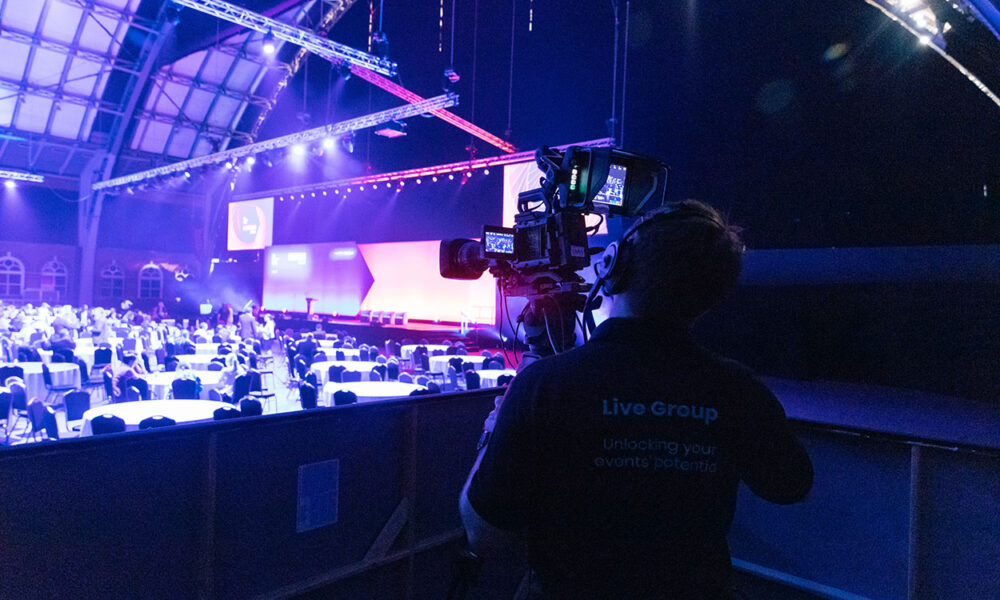
Videography requires more than placing a camera at the back of the room. The team must know what needs to be recorded in full, what will be edited into shorter content, how audio will be captured and which formats are required.
The video plan should include:
- Highlight film: The atmosphere, venue, brand, key speakers, attendee reactions, networking and closing moments.
- Session recordings: Keynotes, panels, fireside chats, training sessions or leadership addresses that require a complete archive.
- Interviews and testimonials: Short contributions recorded in a quiet, well-lit and branded area with confirmed permission.
- B-roll: Signage, room details, audience movement, demonstrations, products, sponsor booths and transitions for editing.
- Social clips: Vertical, square or horizontal footage planned for the intended platform rather than cropped as an afterthought.
- Hybrid and livestream footage: Camera feeds, slides, remote speakers, audience Q&A and recordings that need to be combined later.
Important keynotes benefit from a continuous wide safety shot and at least one tighter angle for speakers and reactions. The exact number of cameras should be based on the recording purpose, stage layout, editing requirements and whether the footage is also supporting a livestream.
Technical and Production Requirements
The media crew should be coordinated with the venue, AV team, livestream provider and event manager before the floor plan and show flow are final. Camera operators need clear sightlines, interview areas need controlled sound and lighting, and livestream or recording systems need clean feeds and tested backups.
For standard video capture, the US Environmental Protection Agency media guide recommends recording at no less than 1920 x 1080 resolution and notes that 30 frames per second is a suitable general setting. It also identifies MP4 as an acceptable delivery format and WAV or AAC as suitable audio formats when available.
Audio deserves the same attention as the picture. The same US Environmental Protection Agency media guide advises recording sound close to the speaker using a lavalier or boom microphone and monitoring the feed through headphones. For corporate events, clean soundboard feeds should be recorded where available, with a separate backup source for important sessions.
The production plan should also confirm tripod and camera-riser rules, backstage access, drone and flash restrictions, power, cable routes, storage, spare batteries, memory cards, backup recording and secure file transfer. Livestreams, cloud uploads and remote approvals should use a dedicated and tested internet connection rather than guest Wi-Fi.
Event-Day Coordination
On event day, the team needs accurate timing, clear access and one fast communication route. A strong brief can still fail if the crew cannot identify the right person, enter the correct area or receive a last-minute schedule change.
Allow enough setup time to inspect the room, test audio, confirm camera positions and capture the venue before guests arrive. The Metropolitan State University of Denver event guide recommends planning approximately one to two hours for setup, depending on the complexity of the event.
Before doors open, confirm that:
- The latest run of show includes speaker timings, stage cues, awards, breaks and VIP movement.
- Media passes and backstage, control-room, VIP-area and loading access are ready.
- The crew has a one-page speaker and VIP reference sheet with photographs.
- One client-side contact or messaging group will communicate urgent changes.
- Private sessions, confidential screens, embargoed announcements and restricted attendees are clearly marked.
- The AV, stage and media teams are aligned on lighting, microphone feeds, slides, cues and camera access.
For multi-room events, assign coverage zones and priorities. This prevents several operators from covering the same session while another important room is missed.
Post-Event Editing and Deliverables
Delivery requirements should be agreed before the event. The brief should state which images are needed urgently, when the full gallery and video edits are expected, how many review rounds are included and who has final approval. Rather than relying on generic industry averages, set delivery volumes and timelines according to the event duration, number of rooms, editing scope and intended channels.
The delivery agreement should clearly cover:
- Photo selection, curation and folder structure.
- The main highlight film, full sessions, interviews, testimonials, speaker cutdowns and social versions.
- Horizontal, vertical, square, high-resolution, compressed and platform-ready formats.
- Captions, subtitles, translations and accessibility requirements.
- Delivery dates, review rounds, revision limits, approvers and final sign-off.
- Cloud delivery, file naming, usage notes, archive period and future access.
Accessibility should be planned rather than added at the end. The W3C Web Accessibility Initiative states that captions are needed for prerecorded video with meaningful audio and are required by WCAG at Level A; live captions are required at Level AA. Section508.gov guidance also recommends planning captions, transcripts and audio description while the media is being produced.
For file protection, use the 3-2-1 backup rule: maintain three copies of important files, use two different storage types and keep one copy off-site. This approach is recommended by the US Cybersecurity and Infrastructure Security Agency. Important backups should also be tested so the team knows the files can be restored.
How to Repurpose Event Photos and Videos
Event content should be treated as a reusable business asset. Speaker highlights, attendee moments, sponsor features, quote cards and short recaps can support LinkedIn and other social channels. Event takeaways, galleries, landing pages and case studies can extend the story on the website, while highlight videos and follow-up resources can support email campaigns.
Sales teams may reuse product demonstrations, testimonials, proof points and speaker clips. Internal communications teams can use leadership messages, employee recognition and regional updates, while recruitment campaigns can show company culture, learning and team engagement. The strongest material can also promote the next conference, launch, roadshow or internal event.
These uses should be planned before filming because a full-session archive, a social clip and a recruitment video require different framing, pacing, sound and subject choices.
Singapore and APAC Considerations
Events across Singapore and APAC often involve visiting leaders, multilingual audiences, hybrid participants, hotel ballrooms, convention centres and several approval teams. The brief should identify regional stakeholders, local venue rules, loading and access requirements, cross-border crew logistics, remote speakers, time-zone constraints and the markets that will use the final content.
Subtitles, translated captions and market-specific versions may need to be planned from the start. Hotel and convention venues may also impose restrictions on camera risers, backstage movement, power, storage and house AV systems.
Photographs and video recordings can contain personal data, so organisers should explain how content will be collected, used and disclosed, identify any restricted participants or sessions, and provide a clear route for questions or withdrawal requests where applicable. The Singapore Personal Data Protection Commission provides Singapore-specific guidance on consent, notification and the handling of photographs and video recordings. Legal requirements vary by event and market, so organisers should confirm the rules that apply to the intended use and distribution.
Budgeting for Photography and Videography
Budgets should be built around the required outputs and business priorities rather than camera equipment alone. Event duration affects crew hours, breaks, storage and file management. Concurrent sessions, large venues and VIP movement may require additional photographers, camera operators or assistants, while full session recordings, panels and livestreams often need separate camera angles.
Post-production can be a significant part of the cost. Photo curation, colour correction, highlight films, subtitles, translated versions, social formats and revision rounds all add time. Same-day or next-day delivery also requires advance planning, dedicated editors and a faster approval process.
The clearest approach is to separate must-have deliverables from nice-to-have deliverables. This allows the production partner to protect the content that matters most without overbuilding the scope.
Common Mistakes to Avoid
Most problems occur when photography and videography are added too late or described too vaguely. A crew that receives the agenda, VIP list and priorities only on event day is more likely to miss important moments. A long, unranked shot list is also less useful than a shorter list divided into must-have, useful and optional items.
Video requests should define the output, purpose, aspect ratio, style, captions and approval process. Audio feeds, audience Q&A and backup recording should be confirmed in advance, while stage lighting, interview lighting and camera sightlines should be checked before the room layout is final.
Permissions, confidential materials and restricted sessions also need clear rules. Finally, delivery dates, revisions, file formats, storage and backup procedures should be part of the original plan rather than negotiated after the event.
Conclusion
Effective corporate event photography and videography starts with a clear purpose, a prioritised brief, coordinated technical planning and agreed delivery requirements. When goals, permissions, camera and audio needs, event-day communication, editing and reuse are planned early, one event can produce valuable content for marketing, internal communications, recruitment, stakeholder reporting and future campaigns. For support with event production, content capture, livestreaming and post-event delivery across Singapore and APAC, contact Live Group to discuss the right setup for your next corporate event.